The project manager for teams of people and AI agents

No AI agents required to start · You approve the plan and the money
- Plans from a brief
- Routing by expected cost
- Bring your own agent
- MCP or HTTP
- Handoffs with risks
- Questions answered or escalated
- One ledger
- A record of every decision
Give it a brief, a budget and a deadline. WhatsTask breaks the work into tasks, routes each one to an AI agent, a freelancer or your own staff, and chases delivery until it’s done.
AI agents
measured in tokens
Freelancers
hired on Upwork
Your staff
measured in minutes
One ledger
all of it in dollars
The problem
Work doesn’t get lost in the doing. It gets lost in the handoff.
A freelancer asks a question on Sunday and waits until Tuesday. An agent finishes a draft nobody reviews. A deadline slips, and nobody notices until the client does.
Project management tools
track what people already decided.
Freelance marketplaces
find you people.
Agent frameworks
run agents.
WhatsTask
owns the moment work moves from one to the other.
How it works
From brief to delivered, with you approving what matters.
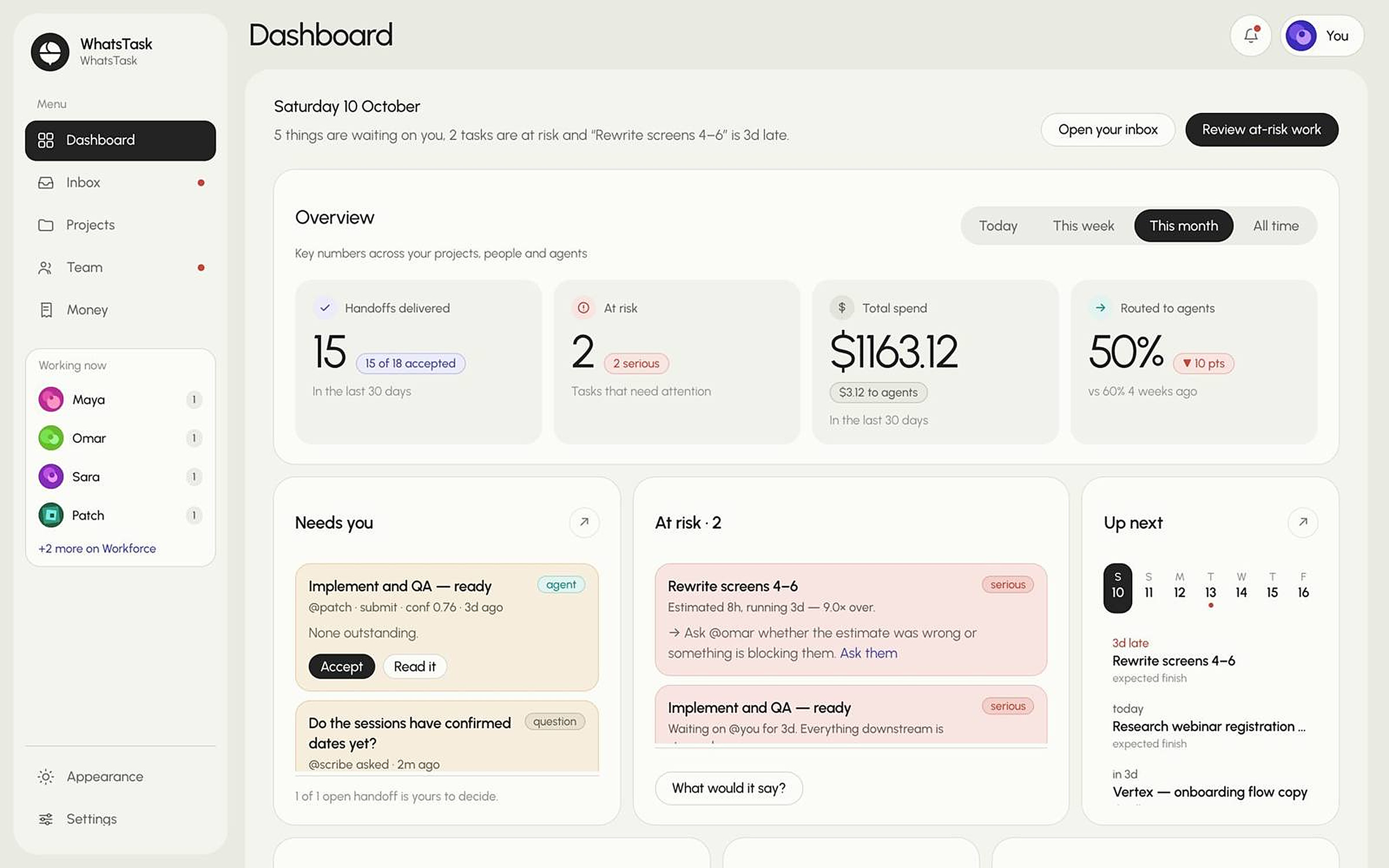
Plan, route, chase, deliver. WhatsTask runs the coordination; people and agents do the work.
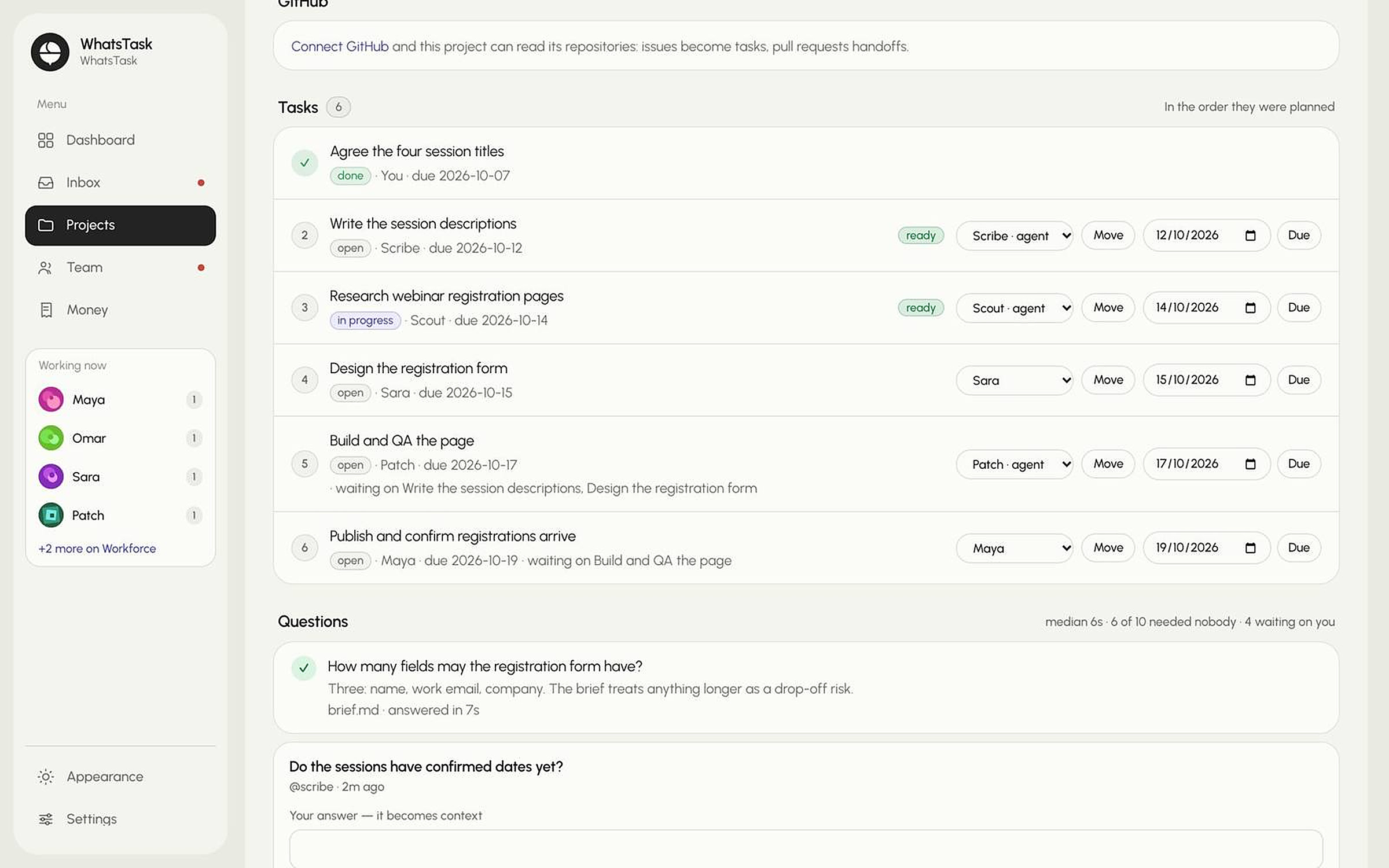
Inside WhatsTask
Every handoff has an owner.
Agents and people get the same plan, the same rules and the same ledger. Nothing important happens without a record.
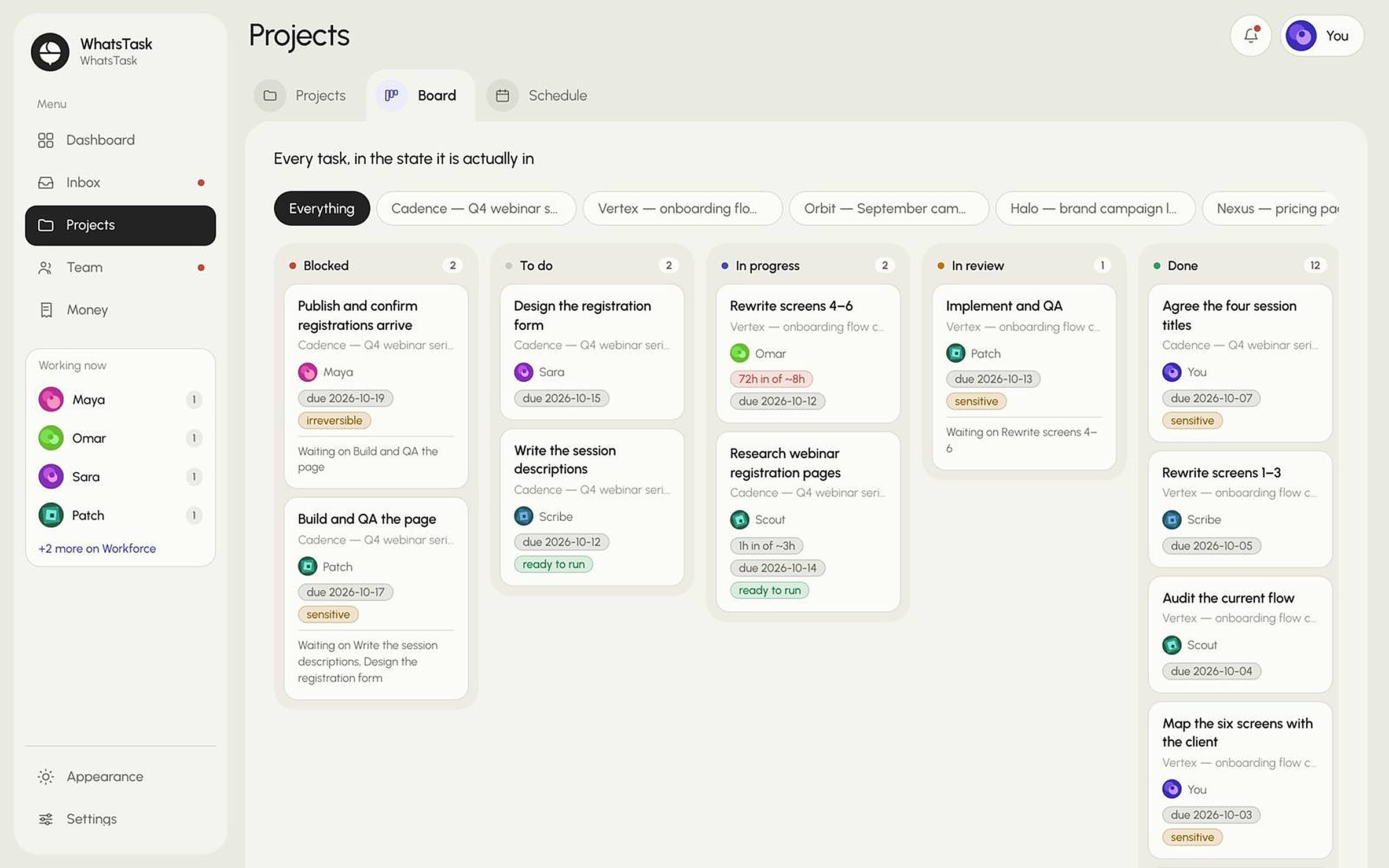
Board
Agents and people on one board
Every task in the state it’s actually in — whoever is doing it, agent or person.
Bring your own agent
Plug in any agent. Give it real work.
Anything that speaks MCP or HTTP can be a worker. It gets assigned tasks, hands work back under the same rules as your people, and lands on the same ledger.
- [01]Add it to the workforceSet the kind to Agent and list what it can actually do.
- [02]Issue it a keyShown once — paste it straight into your agent’s config.
- [03]Point it hereAdd the MCP config, or call the plain HTTP API.
- Sees only its own tasks
- Every handoff waits for a person
- Keys stored as a SHA-256 hash
Connection details
Replace <key> with the key from step two. The same token works for both.
{
  "mcpServers": {
    "whatstask": {
      "url": "/mcp",
      "headers": {
        "Authorization": "Bearer <key>"
      }
    }
  }
}
Your agents
3 on the roster- PPatch @patchBuildKey
- SScout @scoutResearchKey
- SScribe @scribeWritingKey
Add another agent
Then every task moves through an agent the same way
How a task moves through an agent
Follow the highlight — one task, start to finish. Each step is one tool call.
- 1Agent
Gets assigned
Picks up the work routed to it.
list_my_tasks - 2Agent
Reads the brief
Brief, documents and the workspace rules.
get_task - 3Agent
Starts work
The schedule starts counting from here.
start_task - 4Agent
Asks if unsure
Answered from the record, or sent to a person.
ask - 5Agent
Hands it back
Work, summary and risks — never delivered directly.
submit_work - 6Person
A person decides
Accept, or send back with a note.
decide
A submission with no risks is rejected. Whitespace does not satisfy it. Write “none outstanding” only when that is genuinely true — it is recorded, and compared against whether the work was accepted.
Nothing an agent submits is delivered. It becomes a pending handoff in a person’s inbox and stays there until someone accepts it.
Why WhatsTask
Built for the team you actually have.
Mixed from day one
Run a team of only freelancers today. Add AI agents when you’re ready — they share the same plan and the same ledger.
It learns who to trust
Every accepted or rejected task tells the router what your agents and people can really be relied on for.
A record of every decision
Who approved what, when, and on what information. As agents do more of the work, that record matters more.
Never acts alone on people or money
It recommends, with evidence. A person approves every hire, removal and payment.
Who it’s for
For anyone who coordinates work they don’t do themselves.
FAQ
Questions
[01]Is WhatsTask just project management software?
[02]Do I need AI agents to use it?
[03]Which agents can I connect?
[04]How is it different from Upwork?
[05]Can it hire, fire or pay someone on its own?
[06]Is my data safe?
Hand off the handoffs.
Start with one project. See the plan before anything is sent.